
Managing client projects as a freelancer or agency is fundamentally different from internal team collaboration. You're not just tracking tasks-you're managing relationships, expectations, deliverables, and payments. Yet most project management software treats client work the same as internal projects, leaving freelancers to piece together awkward workarounds.
After working with thousands of freelancers and agencies, we've discovered what separates chaotic client management from smooth, profitable operations. This guide shares everything you need to know about client project management, from initial onboarding to final delivery and payment.
Why Client Project Management is Different
Let's start with a fundamental truth: managing client projects requires capabilities that standard project management tools simply don't provide. When you're working with external stakeholders, you face unique challenges that internal teams never encounter.
The Visibility Problem
Internal teams can see everything. They have access to all channels, all documents, all discussions. But clients shouldn't see your internal deliberations, rough drafts, or team frustrations. You need selective visibility-showing clients exactly what they need while keeping internal work private.
This creates a constant tension. You want transparency to build trust, but you also need boundaries to maintain professionalism. Most project management platforms force you to choose: either give clients full access (too much) or keep them in the dark (too little).
The Communication Challenge
When team members collaborate internally, casual Slack messages and quick calls work fine. But client communication requires more structure. You need documented decisions, clear approval trails, and professional presentation. Every interaction shapes your client's perception of your professionalism.
Freelancers often resort to email for client communication, keeping project discussions separate from task management. This fragmentation creates exactly the problems that project management software should solve-scattered information, lost context, and endless searching.
The Approval Workflow
Internal projects rarely require formal approvals at every stage. You build, you ship, you iterate. But client work revolves around approval gates. Deliverables must be reviewed, feedback must be incorporated, and sign-off must be documented before moving forward.
Without proper approval workflows, projects stall in ambiguity. Did the client approve that design? When? What exactly did they approve? These questions haunt freelancers using tools designed for internal teams.
The Payment Connection
Perhaps the biggest difference: client projects are directly tied to revenue. Milestones aren't just organizational tools-they're payment triggers. Deliverables aren't just tasks-they're what you're selling. This financial dimension requires features that internal project management simply doesn't need.
The 5 Stages of Client Project Lifecycle
Every successful client project follows a predictable lifecycle. Understanding these stages helps you set up systems that support rather than hinder your work.
Stage 1: Discovery and Scoping
Before any project begins, you need clarity on what you're building. This discovery phase sets the foundation for everything that follows.
Key activities:
- Understanding client goals and constraints
- Documenting requirements and specifications
- Defining project boundaries and exclusions
- Identifying stakeholders and decision-makers
- Establishing communication preferences
What your PM tool should support:
- Shared requirement documents
- Comment threads for clarification
- Version history for scope changes
- Client access to relevant discussions
Many freelancers skip formal discovery, jumping straight into work. This almost always leads to scope creep, misaligned expectations, and difficult conversations later. Investing time upfront saves exponentially more time downstream.
Stage 2: Planning and Estimation
With scope defined, you need to plan the work and estimate effort. This stage determines your timeline, pricing, and resource allocation.
Key activities:
- Breaking scope into deliverable milestones
- Estimating effort for each component
- Creating project timeline with dependencies
- Setting milestone dates and deadlines
- Defining what "done" looks like for each deliverable
What your PM tool should support:
- Milestone creation with descriptions
- Gantt charts for timeline visualization
- Dependency mapping between deliverables
- Client-visible timeline sharing
The planning stage is where you set expectations. Rushing through it creates problems that compound throughout the project. Take time to think through dependencies, potential blockers, and realistic timelines.
Stage 3: Execution and Collaboration
This is where the actual work happens. Your team (or just you) creates deliverables while keeping clients informed of progress.
Key activities:
- Task creation and assignment
- Progress tracking and updates
- Client communication and check-ins
- File sharing and collaboration
- Issue identification and resolution
What your PM tool should support:
- Kanban boards for workflow visualization
- Real-time progress updates
- Client-accessible status dashboards
- Integrated file management
- Comment threads on specific work items
Execution is where most tools fail freelancers. They're either too simple (just task lists) or too complex (enterprise features you'll never use). The sweet spot is flexibility without overhead-powerful enough to handle complex projects, simple enough to not slow you down.
Stage 4: Review and Approval
As deliverables complete, clients need to review and approve them. This stage is critical for maintaining project momentum and getting paid.
Key activities:
- Presenting deliverables for review
- Collecting and organizing feedback
- Implementing revision requests
- Obtaining formal approval
- Documenting what was approved
What your PM tool should support:
- Approval workflows with clear status
- Feedback collection in context
- Revision tracking and history
- Approval notifications and confirmations
- Audit trail for disputes
The approval stage is where client portals become essential. Clients need a clear, professional interface to review work, provide feedback, and confirm approval. Sending files via email and asking "does this look good?" is unprofessional and creates documentation gaps.
Stage 5: Delivery and Payment
The final stage involves delivering completed work and collecting payment. For milestone-based projects, this happens multiple times throughout the engagement.
Key activities:
- Packaging final deliverables
- Transferring assets and access
- Generating invoices tied to milestones
- Collecting payment
- Closing out the project or phase
What your PM tool should support:
- Milestone completion tracking
- Invoice generation or integration
- Payment status visibility
- Project archiving and handoff
Many freelancers struggle with the business side of delivery. They complete great work but fumble the payment collection. Tools that connect milestones to payments streamline this critical revenue function.
Setting Up Client Portals That Work
A client portal is a dedicated space where clients can view project progress, access deliverables, provide feedback, and approve milestones. It's the professional face of your operation.
Why Client Portals Matter
Without a client portal, you're forced into constant status update emails, attachment hunting, and scattered feedback collection. Clients feel out of the loop, leading to anxiety-driven check-ins that interrupt your work.
A well-designed client portal:
- Reduces status update requests by 80%+
- Centralizes all client communication in one place
- Creates professional impression that justifies your rates
- Documents everything for future reference
- Saves hours weekly on administrative work
Essential Client Portal Features
Not all client portals are created equal. Look for these essential capabilities:
Project Overview Dashboard Clients should see project status at a glance. What milestones are complete? What's in progress? What's coming next? This high-level view answers the "how's my project going?" question without requiring your involvement.
Milestone Progress Tracking Each milestone should show its current status, relevant deliverables, and any pending actions. Clients should understand exactly where things stand without decoding complex project management views.
Deliverable Access Completed work should be easily accessible. Clients shouldn't hunt through email threads to find the latest version of their logo or the final copy for their website. Everything lives in one organized location.
Feedback and Comments Clients need to provide feedback directly in context. Comments on specific deliverables are infinitely more useful than generic emails saying "I have some thoughts." Threaded discussions keep conversations organized.
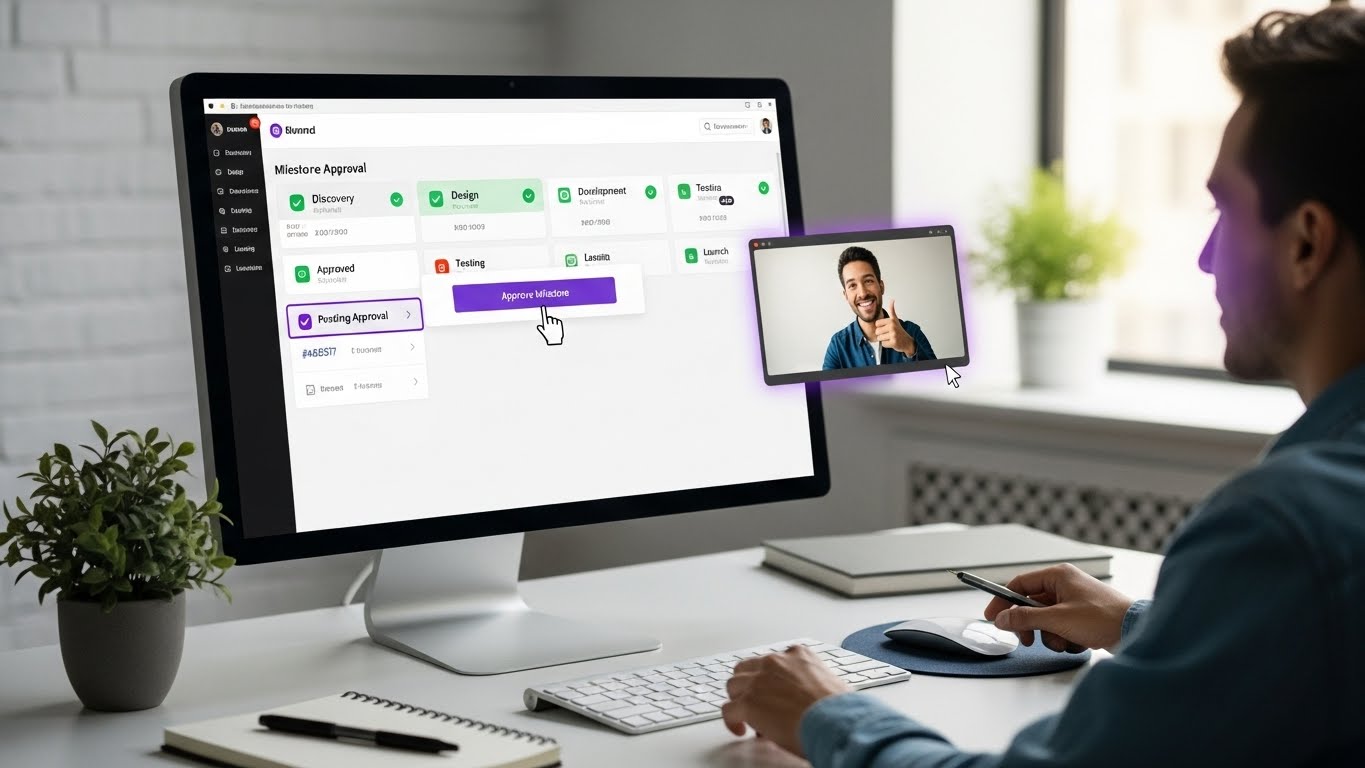
Approval Workflows Clear approval buttons with documented history prevent the "did they approve this?" confusion. When clients click approve, it's recorded with timestamp and details-creating an audit trail that protects both parties.
File Sharing Two-way file sharing lets clients upload assets, reference materials, and content. No more hunting through email for that image they sent three weeks ago.
Setting Up Your First Client Portal
When setting up a client portal in Protawk, follow these best practices:
1. Create a Project Template Start with a template that includes your standard milestones, deliverables, and workflow stages. This ensures consistency across projects and saves setup time.
2. Configure Client Permissions Decide what clients can see and do. Typically, clients should:
- View project overview and timeline
- Access completed deliverables
- Comment on work items
- Approve milestones
- Upload files
But they shouldn't:
- See internal discussions
- Access draft work
- View other clients' projects
- Modify project structure
3. Customize the Experience If possible, brand the portal with your logo and colors. This reinforces your professional image and makes the experience feel custom-built for each client.
4. Send a Welcome Guide Don't just invite clients to the portal-explain how to use it. A brief welcome message or video walkthrough helps clients engage effectively from day one.
5. Keep It Updated A stale portal is worse than no portal. Clients who log in to find outdated information lose trust quickly. Build portal updates into your workflow so they happen automatically.
Milestone-Based Delivery: The Professional Approach
Milestones transform vague projects into concrete deliverables. They create natural checkpoints for review, approval, and payment.
Why Milestones Work
For clients:
- Clear expectations of what they're getting
- Visibility into project progress
- Approval points before moving forward
- Confidence that work is proceeding correctly
For freelancers:
- Defined scope boundaries
- Regular payment triggers
- Protected work through approvals
- Reduced scope creep
For the project:
- Natural review points
- Clear success criteria
- Documented progress
- Manageable chunks of work
Defining Effective Milestones
Good milestones share common characteristics:
Specific and Measurable "Design phase" is too vague. "Completed homepage design with mobile responsive layouts" is specific. Clients should know exactly what they're approving.
Valuable Standalone Each milestone should deliver tangible value. If the project ended at any milestone, the client should have something useful. This protects both parties.
Appropriately Sized Too small creates administrative overhead. Too large delays feedback and payment. For most projects, 3-6 milestones provide the right balance.
Logically Sequenced Milestones should follow natural project flow. Don't make clients approve development before design is complete. The sequence should make intuitive sense.
Milestone Approval Workflows
Once you've defined milestones, you need a system for getting them approved.
Step 1: Prepare Deliverables Before requesting approval, ensure all milestone deliverables are complete and polished. Presenting unfinished work wastes everyone's time and damages your reputation.
Step 2: Present for Review Notify clients that the milestone is ready for review. Provide context about what they're reviewing and what feedback you need. Make it easy for them to evaluate the work.
Step 3: Collect Feedback Give clients a clear way to provide feedback. Comments directly on deliverables work better than separate emails. Set expectations about revision limits if applicable.
Step 4: Implement Revisions Address feedback systematically. Track what was changed and why. If requests exceed scope, discuss before implementing.
Step 5: Obtain Approval Request formal approval once revisions are complete. The approval should be documented with timestamp-a simple "approved" comment isn't enough. Use proper approval workflows.
Step 6: Trigger Payment With approval documented, invoice for the milestone or trigger automatic payment if you have systems in place. Don't delay-approved milestones should convert to revenue quickly.
Handling Revisions Without Scope Creep
Revisions are inevitable, but unlimited revisions will destroy your profitability. You need clear policies and systems to manage revision requests.
Setting Revision Expectations
Before projects begin, establish revision policies:
Revision Rounds Specify how many rounds of revisions are included. "Two rounds of revisions per milestone" is clear and manageable.
Revision Scope Define what counts as a revision versus a new request. Tweaking colors is a revision. Adding a new page is a new request.
Revision Timing Set deadlines for feedback. "Please provide all feedback within 5 business days" prevents projects from dragging indefinitely.
Additional Revision Costs Clearly state costs for revisions beyond included rounds. This discourages endless tweaking while providing options if clients need more iterations.
Tracking Revision Requests
When revision requests come in, document them properly:
- What specifically needs to change
- Why the change is requested
- Whether it's within scope
- When it was received
- When it was completed
This documentation protects you if disputes arise and helps identify clients who consistently exceed revision allocations.
Managing Scope Creep
Scope creep happens when revision requests expand beyond the original scope. "Can you also add..." and "While you're at it..." are warning phrases.
Identify Creep Early The sooner you address scope creep, the easier it is to manage. Don't let small additions accumulate into major unpaid work.
Respond Professionally "That's a great idea! It's outside our current scope, but I'd be happy to provide a quote for adding that feature." This positions you as helpful while protecting your boundaries.
Document Everything When clients request out-of-scope work, document the request, your response, and any agreements. This prevents "but I thought that was included" disputes.
Offer Change Orders For significant scope additions, create formal change orders documenting new requirements, timelines, and costs. Treat them as mini-contracts.
Communication Best Practices for Client Work
How you communicate with clients shapes their entire experience. Poor communication kills projects regardless of work quality.
Choosing Communication Channels
Different communications require different channels:
Project Updates: Client portal or project management platform Quick Questions: Chat if available, otherwise email Complex Discussions: Video calls Formal Approvals: Documented in project management tool Urgent Issues: Direct message or phone
Establish these norms at project kickoff so clients know what to expect.
Frequency and Timing
Regular Updates Don't wait for clients to ask. Proactive weekly updates-even when there's nothing major to report-build confidence and prevent anxiety-driven check-ins.
Prompt Responses Acknowledge client messages within one business day, even if you can't fully respond yet. "Got this, I'll have a full response by Thursday" is better than silence.
Respectful Timing Unless genuinely urgent, avoid late-night or weekend messages. This sets boundaries while showing respect for everyone's time.
What to Communicate
Progress Updates What was completed, what's in progress, what's coming next. Keep it brief but substantive.
Blockers and Delays If something might impact timeline, communicate immediately. Bad news doesn't improve with age.
Decisions Needed When you need client input, be specific. "Please choose between option A and option B by Friday" is actionable. "Let me know your thoughts" is not.
Wins and Milestones Celebrate progress. "Great news-the homepage design is complete and ready for your review!" builds positive momentum.
Building Long-Term Client Relationships
One-off projects are expensive to acquire. Repeat clients and referrals are where real freelance profitability lives. Your project management approach directly impacts relationship longevity.
Exceeding Expectations
Clients remember experiences, not just deliverables. Small touches create lasting impressions:
- Deliver slightly ahead of schedule
- Include small bonuses when possible
- Anticipate needs before being asked
- Provide unexpected value
Gathering Feedback
At project completion, ask for feedback. What worked well? What could improve? This information helps you refine your process while making clients feel heard.
Staying in Touch
Projects end, but relationships shouldn't. Periodic check-ins, helpful resources, and holiday greetings keep you top-of-mind for future work and referrals.
Requesting Referrals
Happy clients refer others, but sometimes they need prompting. After successful projects, ask: "Do you know anyone else who might benefit from similar work?" Make referring easy by providing clear descriptions of who you help and how.
Tools and Templates for Client Project Management
Having the right tools makes everything easier. Here's what you need:
Essential Project Management Features
When choosing a project management system for client work, prioritize:
Client Portal: Non-negotiable for professional client management Milestone Tracking: Essential for structured delivery Approval Workflows: Critical for documented sign-off File Management: Centralized asset storage Permission Controls: Client vs. internal visibility Multiple Views: Kanban boards, Gantt charts, and more for flexibility
Templates to Create
Build templates for recurring project types:
Discovery Template
- Initial questionnaire tasks
- Requirements documentation
- Scope definition checklist
- Kickoff meeting agenda
Project Execution Template
- Standard milestones for your project type
- Common deliverable tasks
- Review and approval tasks
- Delivery and closeout tasks
Communication Template
- Welcome email/message
- Weekly update format
- Feedback request format
- Project completion message
Common Mistakes to Avoid
Learn from others' failures:
Mistake 1: No Clear Scope
Starting work without documented scope invites disaster. Even eager clients need formal scope agreement before work begins.
Mistake 2: Email-Based Approvals
"Looks good!" in an email isn't proper approval. Use formal approval workflows with documentation.
Mistake 3: Invisible Progress
Clients who can't see progress assume nothing is happening. Even if work is on track, lack of visibility creates anxiety and check-ins.
Mistake 4: Delayed Invoicing
Completed milestones should trigger immediate invoices. Delayed invoicing delays payment and looks unprofessional.
Mistake 5: No Revision Limits
Unlimited revisions sound client-friendly but destroy profitability. Set clear limits from the start.
Mistake 6: Mixing Internal and Client Communication
Clients seeing internal discussions is unprofessional and potentially damaging. Keep channels separate.
Putting It All Together
Effective client project management isn't about any single tool or technique-it's about creating systems that serve both you and your clients. When done well, everyone benefits:
Clients get:
- Clear visibility into their projects
- Professional experience that justifies investment
- Confidence in project progress
- Easy ways to provide feedback and approval
You get:
- Reduced administrative overhead
- Fewer interrupting check-ins
- Clear documentation for disputes
- Faster payment collection
- More referrals and repeat business
The best project management software for freelancers and agencies isn't the one with the most features-it's the one that makes client work smoother, more professional, and more profitable.
Start Managing Client Projects Better Today
Whether you're a solo freelancer or growing agency, professional client project management transforms your business. It's the difference between chaotic, stressful projects and smooth, profitable engagements.
Protawk was built specifically for freelancers and agencies who need client collaboration features that traditional project management tools lack. Our client portal, milestone approvals, and permission controls create the professional experience your clients expect.
Ready to transform your client project management?
Start Your Free Trial and see why thousands of freelancers and agencies trust Protawk for their client work.
Because professional client management shouldn't require enterprise software.